Xavier Slim

Updated 2 years ago

Microsoft gets back on track with a promising web browser

Internet Explorer 8 is Microsoft's incredibly popular web browser. Almost everyone has used some version of it, and you can be sure all websites will support it.

Top Recommended Alternative

What new functionlity does IE 8 bring?

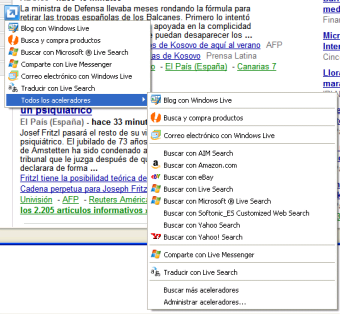
Internet Explorer 8 includes two main new tools: one is Accelerators (previously known as Activities), and the other is Web Slices. The first one gives you direct access to various online services just by right-clicking anywhere on the web page or on highlighted text. For instance, you can look up a word, map an address or perform a search with those marked words. The main drawback is that all these options use Microsoft's Windows Live services which means that you're stuck with them.

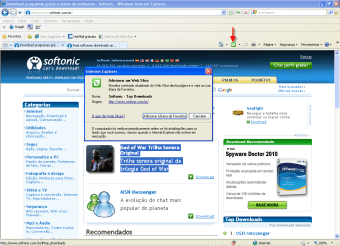
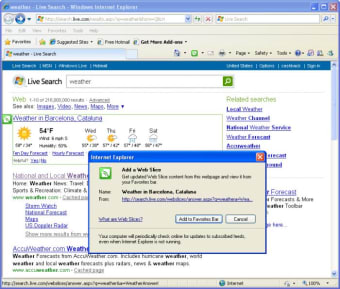
Regarding Internet Explorer's Web Slices, these are a kind of RSS-style tool that tracks changes and updates to selected websites and keeps you informed about them. It comes in really handy for tracking small changes that can't be followed by RSS, without having to visit the site: online auction bids, stock exchange values, weather information and more.

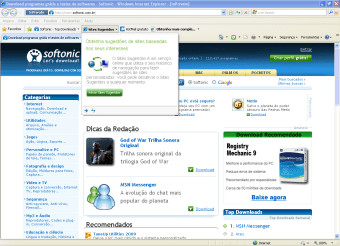
Besides these two tools, Internet Explorer 8 also includes many interesting new features. One of them, the 'Suggested sites' function, recommends new websites you may not know about, based on your browsing history.

The return of the menu bar

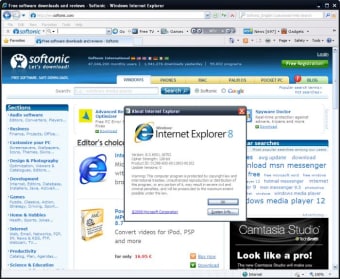
The interface of Internet Explorer 8 hasn't changed that much compared to older versions, except for one small detail; the menu bar is back and shows up by default again. Besides that, everything else is in place: the address bar is again on top of the interface, and Favorites are accessible via a drop-down menu.

Protecting your privacy and security

Internet Explorer 8 includes InPrivate Browsing, Internet Explorer's version of the popular Chrome Incognito mode. While InPrivate Browsing is on, the browser won't save data, including cookies, history and temporary Internet files. As for security, Internet Explorer 8 includes the so-called SmartScreen filter, which prevents you from entering fraudulent websites and protects you from online phishing scams.

The verdict

Internet Explorer 8 is truly a giant step forward, and proves that Microsoft is working hard to offer a more secure, compatible and customizable browser.

Changes

Web Slices - subscribe to specific content from web pages Visual search box Suggested sites Accelerators Improved performance New tabs features Improved search Tab grouping Improved zoom


Xavier Slim

Xavier Slim has experience in English writing supported by academic recognition and creative competitions. He has worked on tutoring and editorial projects, developing content that balances clarity with creativity. His interests in writing and technology inform his practical approach to reviewing digital tools.

  • Pros

    • Standard compliant
    • Interesting new features: Accelerators, Web Clips
    • New InPrivate browsing
    • Protection against online scams and malware
  • Cons

    • Accelerators are tied to Microsoft's online services
    • Privacy issues in Suggested sites
 0/6

App specs

  • License

    Free

  • Version

    8.0.6001.18702
  • Latest update

  • Platform

    Windows

  • OS

    Windows XP

  • Language

    English

    Available languages

    • Arabic
    • Danish
    • English
    • Spanish
    • Finnish
    • French
    • Italian
    • Japanese
    • Korean
    • Dutch
    • Norwegian
    • Portuguese
    • Russian
    • Turkish
  • Downloads

    9.5M

    Last month's downloads

    • 808
  • Size

    17.16 MB

  • Developer

Program available in other languages


Icon of program: Internet Explorer 8

Internet Explorer 8 for PC

  • Free
  • 3.3
    6685
  • 9.5M
  • V8.0.6001.18702

User reviews about Internet Explorer 8

3.3

15 reviews

Add review

Main reviews for you

  • Anonymous user

    This is an awesome browser.. I'm using Windows XP with Internet Explorer 8 installed. I use ths browser regularly but find no faults at all. This is a great browser. Pros: Its so simple to use.I love its metro mode and compattibility with other Microsoft Products.

  • Anonymous user

    Don't like it!. Internet Explorer is the worst browser I used. it keeps crashing on me so I now use Mozilla Firefox. I did download internet explorer 10 and still the same thing occurs. I will never use internet explorer again and I am looking at not using Microsoft products again. Pros: Nothing Cons: It need to be more stable, quit crashing

  • Anonymous user

    IE. Bad HTML5 support, overcomplicated UI; terrible for devs and users alike. IE9 and IE10 aren't too bad, but <IE8 are almost completely horrible. Cons: everything

  • Anonymous user

    Are you serious?. Internet Explorer 8 is like Netscape Navigator. It's old and slow and horrible. The startup takes like 5 minutes, page loads like in 10 seconds. Games freeze and lagg, Internet Explorer has problems everywhere. Pros: -less memory Cons: - Everything you can think of.

  • Anonymous user

    IE8 Does not Even work with Microsofts own products. Recently implemented in the Government, IE8 does not work properly with Share Point 2010 portal services. The web parts and images do not display correctly or work properly. And of course, because it is the Government we can't upgrade to IE9 until it is done by committee agreement and approved globally. Pros: Works with most non-government web-sites. Cons: Works with hardly any government web-site or Share Point portals.

  • Anonymous user

    Can I go back. Can I go back from explorer 9 back to version 8?I am having trouble with version 9.It has slowed down my computer!


More

You may also like

Alternatives to Internet Explorer 8

Explore Apps

Related Articles

Latest articles

Laws concerning the use of this software vary from country to country. We do not encourage or condone the use of this program if it is in violation of these laws.
Softonic

Is Internet Explorer 8 safe?

96/100

Score result: Clean

This file passed a comprehensive security scan using VirusTotal technology. It is safe to download.

  • Virus free
  • Spyware free
  • Malware free
  • Verified by Security Partners

    VirusTotal logo

Scan Info

Last scan
Wednesday, December 20, 2023
Scan provider
VirusTotal · Full report

File Integrity

File
IE8-WindowsXP-x86-ENU.exe
SHA256
5f9b6ff015649622a53d941b7750f033faf9f7a63f7196995eebc36d1dff39f0
SHA1
746719ee7b2a0926177f5a21573a740c1c3b2fcf

Softonic security commitment

Internet Explorer 8 has been thoroughly scanned by our advanced security systems and verified by industry-leading partners. This file comes from the official developer and has passed all our security checks, showing no signs of viruses, malware, or spyware. For more information, visit our Security and Trust Center